Media2URL
PUBLISH HTML ONLINE

HTML to URL Converter

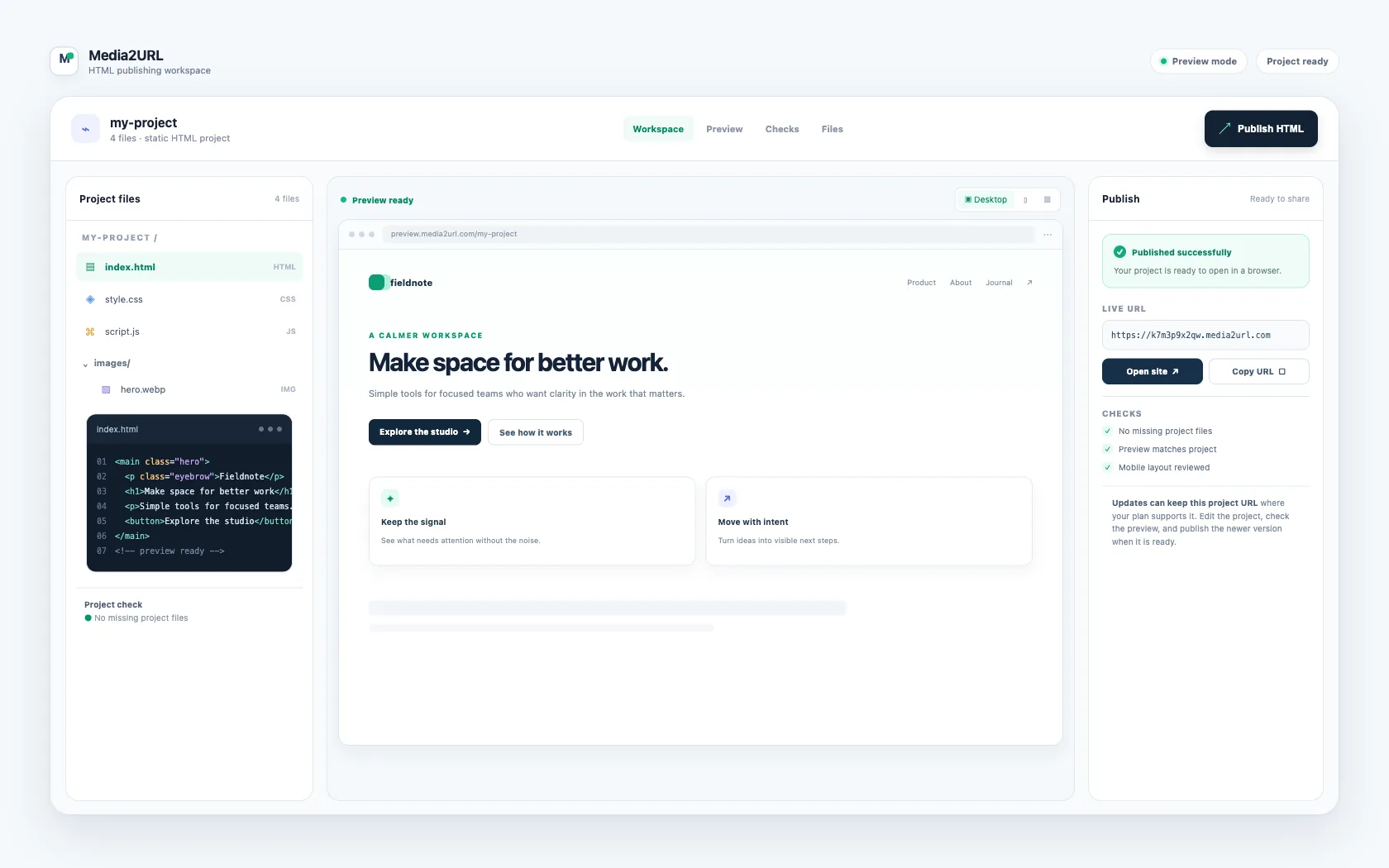
An HTML file can work perfectly on your own computer and still be difficult to share with someone else. Media2URL lets you paste the code or upload the file, check how the page looks, and publish it as a live URL that you can open or send to anyone.

If the page also uses CSS, JavaScript, images or fonts, upload the related files or a ZIP so the project can keep its normal folder structure.

Free publishing is available. Guests get a free 1-hour URL; free accounts can keep one Editable URL with no fixed expiry.

index.html
UTF-8HTML5Tab: 2 spaces
Ln 87, Col 7
Live examples

Explore live HTML demos

These fictional projects are temporary examples of what a hosted HTML page can become. Open one, try the interactions, then use the same workflow for your own page.

Static HTML, CSS and browser JavaScript
Product prototype

Orbit Studio

A fictional SaaS launch page with a pricing switch and feature explorer.

Try the interaction
  • Switch monthly and yearly pricing
  • Filter feature tabs
  • Toggle the visual theme
Open demo
Interactive lesson

Studyforge

A fictional classroom lesson that turns a topic into a short browser quiz.

Try the interaction
  • Answer three quiz questions
  • Track lesson progress
  • Reveal answer feedback
Open demo
Event invitation

Gather

A fictional event page with a live countdown and a lightweight RSVP flow.

Try the interaction
  • Watch the event countdown
  • Submit a guest name
  • Show client-only RSVP confirmation
Open demo
DATA DASHBOARD

MetricBoard

A fictional reporting page with summary cards, a small chart, and simple filters.

Try the interaction
  • Change the date range
  • Filter the displayed results
  • Switch between chart views
Open demo
Workflow Guide

How to Convert HTML to a URL

An HTML page becomes much easier to share once it has a normal web address. Media2URL keeps the process simple, so you can check the page before anyone else receives the link.

1

Add your HTML

Paste the code into the editor or upload an existing HTML file. If the page also depends on CSS, JavaScript, images, or fonts, include those files as part of the project.

2

Check how the page looks

The preview shows the page as it will open in a browser. Switch between common screen sizes and open the Checks tab if something looks wrong or a project file is missing.

3

Publish the page

Choose Publish HTML when the page is ready. Media2URL places the project online and creates a public web address for it.

4

Copy and share the URL

Open the published page yourself or copy the URL and send it to someone else. If your plan supports updates, you can change the project later without replacing the existing link.

Definition

What Does an HTML to URL Converter Do?

An HTML to URL converter takes HTML code or an HTML file and publishes it at a web address that another person can open in a browser. Instead of sending the source file, you share the generated URL and the visitor sees the rendered page.

Real Situations

Where an HTML Link Is Actually Useful

Sometimes the HTML is already finished. The difficult part is simply getting it in front of another person without asking them to download files, open a local folder, or understand how hosting works. These are some situations where a normal web link makes the process much easier.

Share a page created with an AI tool

ChatGPT, Gemini, and similar tools can give you a complete HTML page, but the result usually arrives as code. Sending that code to someone else does not show them the finished page.

Paste the HTML into Media2URL and check the result first. If the code expects an image or another file that was never included, the Checks tab can point that out before you publish. Once everything looks correct, you can send the live URL instead of the original code.

Send a client a working prototype

A design idea is easier to review when the client can actually click through it. A small HTML prototype can show buttons, menus, forms, or other browser interactions before the full website is ready.

Publish the prototype and send one link for review. If you notice a typo or change part of the layout later, supported projects can be updated without asking the client to open a completely different address.

Share a class project or interactive lesson

Students often build small HTML pages, quizzes, and classroom projects that work on their own computers. Sharing the original folder can be confusing because another person needs to know which file to open and the related project files must stay in the correct place.

Publishing the project turns it into a normal browser link. A teacher or classmate can open the page directly without unpacking the original project folder.

Publish an invitation or small event page

A birthday invitation, event page, or simple RSVP page may only need HTML, CSS, and browser JavaScript. Setting up a complete hosting account for something this small can feel unnecessary.

Keep the project files together, check the page on a phone, and publish it when it looks right. You can then send the event link through chat or email instead of sending an HTML attachment.

Diagnostic Checks

Check Your HTML Before You Share It

A page can look correct on your own computer and still break after it goes online. An image may point to a local folder, a CSS file may be missing, or part of the layout may become wider than the screen on a phone.

The Checks tab looks for problems that Media2URL can detect before you publish. Instead of only saying that something is wrong, it points out the file or part of the page involved and explains what the visitor may experience.

Missing fileWarning
images/hero.png

The page expects this image, but the file is not part of the project yet.

Add file·Show in code
Phone layoutLayout
One section extends outside preview

The page may require sideways scrolling on smaller mobile screens.

Show element·Show in code
External connectionNotice
cdn.jsdelivr.net

This page loads JavaScript from this website when someone opens it.

View details

Host HTML With CSS, JavaScript and Images

Many pages depend on files stored beside index.html. A style sheet may control the design while JavaScript handles an interaction, and images or fonts may sit inside their own folders. Uploading only the HTML file can therefore leave a page looking very different from the version on your computer.

For a project with several files, upload the related files or use a ZIP so Media2URL can keep the folder paths together. The Files view shows what belongs to the project, while the checks point out references to files that are still missing.

Project Structure
index.html
style.css
script.js
images/
logo.png

Update Your HTML Without Changing the URL

A page often needs one more change after the link has already been shared. You may notice a typo, replace an image, or change part of the layout after a client or friend has opened it.

Signed in users can edit the same Media2URL project and publish the updated version while keeping its existing URL. People who already have the link can then open the newer version without waiting for you to send another address.

HTML to URL Is Different From URL Encoding

The names sound similar, but they solve different problems. HTML to URL on Media2URL means putting an HTML page online and giving it a web address that another person can open.

URL encoding changes certain characters so they can safely appear inside a URL. It does not host the HTML page or turn the page into a website.

HTML to URL Questions

How do I convert HTML to a URL?

An HTML page needs to be published somewhere before another person can open it through a normal web address. Paste the code into Media2URL or upload your HTML file, check the preview, and choose Publish HTML. When publishing finishes, you receive a URL that you can copy and share.

Can I upload an HTML file and get a link?

An existing .html or .htm file can go straight into the uploader, so you do not need to copy its source manually. Media2URL opens the file in the workspace first, which gives you a chance to check the page before creating the link. Projects that also need CSS, JavaScript or images can include those files as part of the project.

Can I turn an HTML file into a website?

A static HTML page can be published at its own web address, which means other people can open it like a small website. If the page depends on related project files, include them so the public version can load them too. Media2URL does not run server programs such as PHP or Python.

Can I convert HTML to a URL online for free?

A temporary public URL is available for simple guest projects within the free limits. You can paste or upload the HTML, check the page, and publish the result without buying a plan first. Permanent projects, larger uploads, and updates to the same URL are available with the paid plans.

Does CSS and JavaScript work after I publish HTML?

CSS and browser JavaScript can work when the required files are part of the project or are loaded from supported public addresses. A ZIP project can keep files such as style.css, script.js and images in their expected folders. The preview is the best place to check the result before publishing.

Can I update my HTML without changing the URL?

Signed in users can keep a project and publish a newer version to the same project address when this feature is available on their plan. This is useful when a link has already been sent to someone and the page needs a correction. The older link does not need to be replaced.

Can I publish HTML created by ChatGPT or Gemini?

HTML from an AI tool can be pasted into the editor in the same way as code written by hand. The preview lets you see what the generated page actually does before publishing it. If the code refers to a file that was never included, Media2URL can point out the missing path instead of leaving you to guess why the page looks wrong.

Is HTML to URL the same as URL encoding?

No. Media2URL publishes an HTML page and gives the page a web address, while URL encoding only changes certain characters so they can be placed safely inside a URL. Encoding alone does not put an HTML page online.

Other media tools

Need a link for a file rather than a complete HTML page? These Media2URL tools handle images, PDFs, general files and temporary uploads.

Image to Link Converter

Upload an image and get a direct image URL or a share page.

PDF to Link Converter

Upload a PDF and create a link people can open in the browser or download.

File to Link Converter

Create a link for supported documents, archives and other files.

Temporary File Upload

Share a file with a link that expires after the time you choose.

HTML to URL Converter: Turn HTML Into a Live Link | Media2URL