

Client proposal
Merge the cover and proposal pages, remove anything the client should not receive, add numbering and save the final copy separately.
A PDF often needs one small change before it is ready to send. The pages may be in the wrong order, two documents may need to become one, or only a few pages from a longer file may actually be useful.
Media2URL keeps these PDF tasks inside the same workspace as your stored files. You can work on the document, check the result and then decide whether the finished PDF should become a new asset, a version of the source or a replacement.
When a finished PDF only needs a shareable URL, use the PDF upload and link tool to host it and copy its available links.
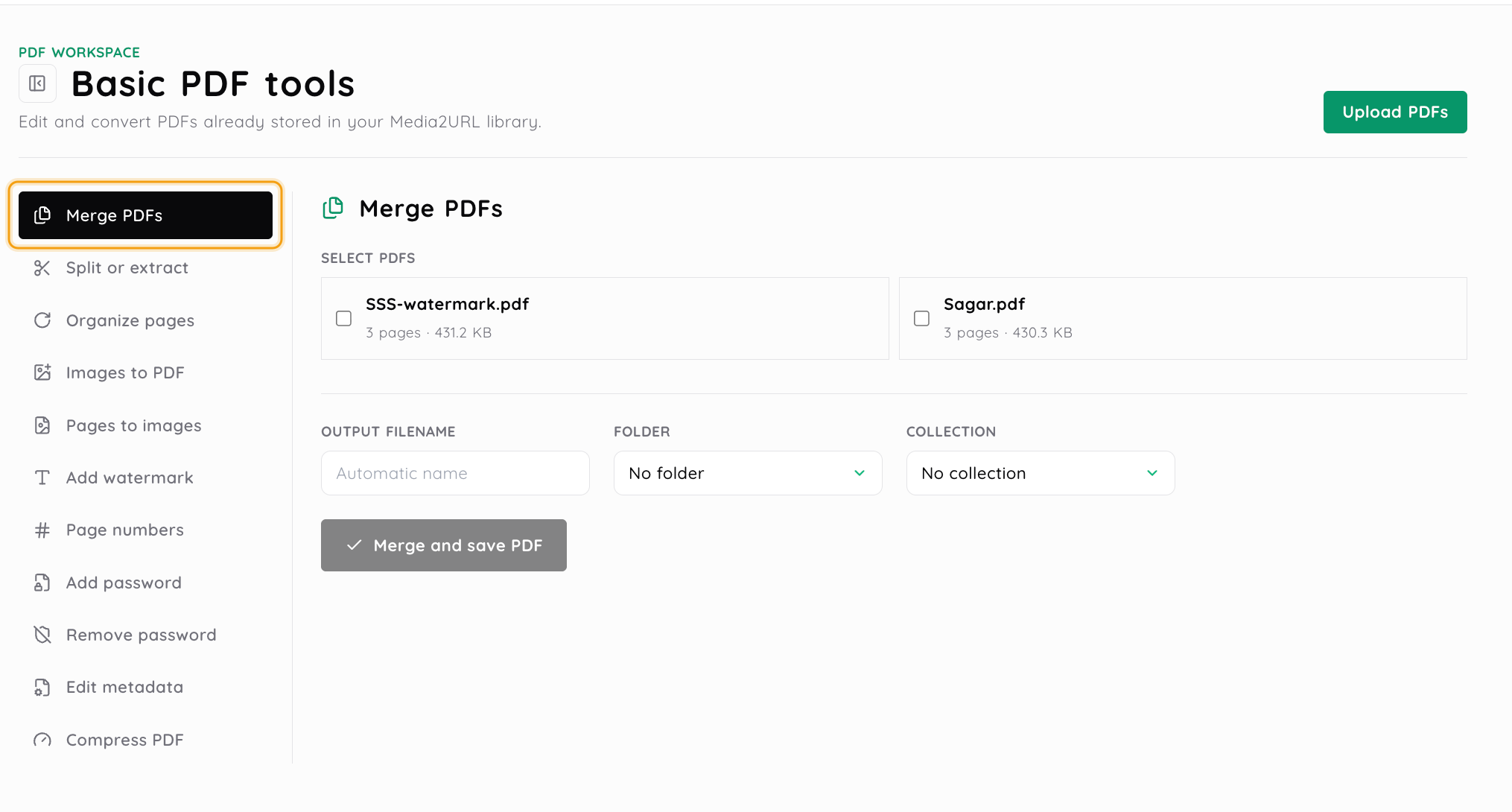
There is no reason to run a PDF through several tools when one operation already solves the problem. A proposal may need two files merged, while a long report may only need three pages extracted.
Choose the task first. The workspace then shows the controls needed for that operation.
Choose one or more PDFs already stored in the active workspace. A protected document can ask for its current password when access is required before processing.
Merge documents, split or extract pages, organise the page order, add document elements or use one of the available conversion, compression or protection tools.
Review the source pages and the settings that matter for that operation. A merge can show the source page counts and expected output length before the new document is created.
Save the processed PDF as a new asset, attach it as a version or replace the source where that option is available. The finished asset can then use its available direct URL, share page and download link.
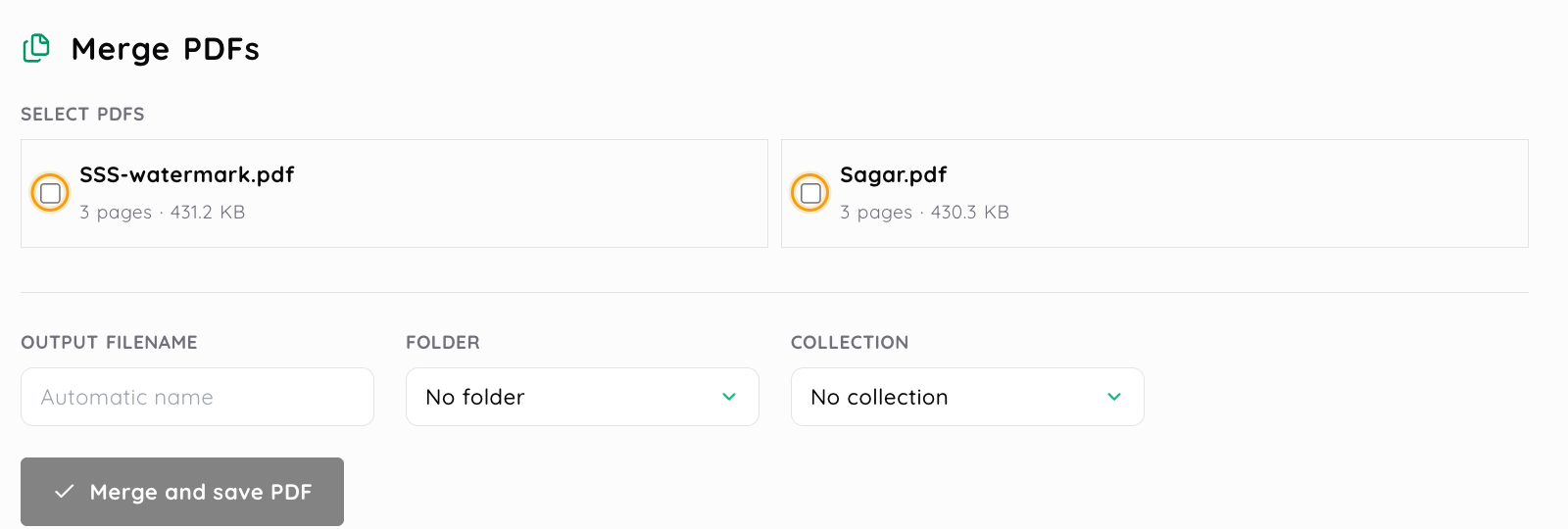
The merge panel shows each source document's page count and file size. Select the PDFs you need, then set an output name, folder and collection before saving the merged copy.
| What needs changing | Relevant PDF Workspace tools |
|---|---|
| Document structure | Merge, split, extract, reorder, rotate, duplicate and delete pages |
| Page presentation | Watermarks, page numbering and images to PDF assembly |
| Document access and information | Password protection, password removal and metadata editing |
| Output and delivery | PDF compression, pages to images conversion, save modes and link delivery |
The same PDF may need more than one of these jobs, but they solve different problems. Reordering pages changes the structure of the document, for example, while compression is concerned with the resulting file rather than which pages it contains.
Combining PDFs does not have to mean taking every page from every source. A proposal might need pages 1 to 3 from one PDF and pages 5 and 8 to 10 from another.
Media2URL lets you choose the source PDFs, arrange their order and enter page selections for each file where required. The pre flight step checks the source page counts and shows how long the combined document is expected to be before processing starts.
This is useful when the source documents contain appendices, old pages or other sections that do not belong in the final PDF.
| Operation | Use it when |
|---|---|
| Every Page | Each page should become its own PDF file |
| Custom Ranges | One long PDF should become several grouped documents such as pages 1 to 4 and 5 to 10 |
| Extract Pages | Only particular pages such as 2, 7 and 12 need to become a separate result |
| Page Organizer | The PDF stays one document, but pages need to be moved, rotated, copied or removed |
This distinction matters when the recipient only needs part of a document. Extracting the useful pages can be cleaner than sending a fifty page PDF and asking someone to find the relevant section themselves.
Page numbers alone can become awkward when a document has many pages or several similar sections. The visual organizer shows the pages as a grid so you can move them into the required order before creating the next PDF.
A selected page can also be rotated, duplicated or removed. This works well when a scan contains an upside down page, a document has an accidental duplicate or one page should appear in another position.
Sometimes the source is not a PDF yet. A group of stored JPEG, PNG or WebP images can be arranged and combined into one PDF when they need to travel as a single document.
The opposite workflow is useful when a page needs to become an image. PDF pages can be rendered as PNG or JPEG outputs, then saved as individual image assets or collected into a ZIP where that output is available.
A watermark adds information over the document itself. You may use text for a review label or place a stored logo image over the pages when the document needs visible branding. The PDF Workspace lets you control the available watermark position, size, rotation, colour and opacity. Image watermarks can also be scaled and positioned before the processed file is saved.
Page numbering is useful for navigation rather than branding. You can choose a simple number, a Page 1 style label or a total count format such as Page 1 of 12, then set the starting number and available position or appearance controls.
Password protection can be applied to the PDF document itself. Where the current PDF operation supports it, you can create protected output using the available user and owner password settings. Removing document protection is a separate operation. A protected PDF needs the valid current password before Media2URL can create an unlocked output.
This should not be confused with Media2URL link access. A PDF password affects the document file, while private sharing or sharing protected by a password controls how someone reaches a hosted link. A document can therefore need one type of protection or both, depending on how it will be distributed.
A document called final v4.pdf does not tell the next person very much about what it actually contains. PDF metadata gives the file another set of descriptive fields that can travel with the document.
The Media2URL metadata editor can inspect and update the standard Title, Author, Subject and Keywords fields. Changing these properties does not rewrite the visible text printed on the PDF pages.
A brochure might use the product name as its title and the company name as its author. A client handout may instead need a clear subject and keywords that make sense when the document is found again later.
A smaller PDF is useful when the current file is unnecessarily heavy for email, download or browser sharing. The useful amount of compression depends on what is inside the document.
Media2URL provides High, Balanced and Light compression choices. High aims for a smaller result, Balanced sits between size and fidelity, while Light is the safer starting point when preserving image or print detail matters more.
The completed job reports the actual byte reduction and saved percentage. That number is more useful than promising that every PDF will shrink by the same amount.
| Save choice | Use it when |
|---|---|
| Save as New Asset | The processed document should remain completely separate from the source |
| Attach as Version | The new PDF belongs to the same document history and the earlier version should remain available |
| Replace Source | The processed PDF should become the active file for that asset |
The choice matters most when the PDF already has links in use. Replacing the source updates the live asset workflow, while saving another asset gives the processed document its own separate place in the library.
Outputs can also be routed into the available folder or collection when the processing job is created, which helps keep the finished document with the project it belongs to.
Merge the cover and proposal pages, remove anything the client should not receive, add numbering and save the final copy separately.
Extract only the pages needed for one person instead of sending the full report again.
Reorder pages, rotate incorrect scans and combine stored page images into a cleaner PDF.
Add a watermark or update metadata, then choose whether the new PDF should replace the current asset or remain as another version.
Yes. A merge can use selected page ranges from each source instead of automatically taking the whole document. Set the order and page selections first, then review the source page information before starting the merge.
Splitting creates separate documents according to the selected split mode. Extraction is better when only particular pages from the source need to become another PDF.
Yes. The visual page organizer lets you change the page order and use the available rotation, duplication or delete controls before saving the processed PDF.
Yes. Supported stored JPEG, PNG and WebP images can be combined into a PDF using the available image to PDF workflow.
Yes. PDF pages can be rendered into supported PNG or JPEG outputs. Depending on the operation, the results can be saved as individual image assets or provided together as a ZIP.
Yes, where the protection tool is available for your account. Document password protection is separate from the access settings used for a Media2URL share link.
Yes. The metadata editor can update standard fields including Title, Author, Subject and Keywords without changing the visible text printed on the pages. Those are recognised PDF document property fields.
No. The result depends on what the document contains and how much can be changed by the selected compression preset. Media2URL reports the actual size change after processing instead of assuming every PDF will produce the same saving.
The source is not automatically replaced simply because you processed it. Choose Save as New Asset, Attach as Version or Replace Source according to the save modes available for that operation.
Yes. Once the processed output is saved as an asset, use the direct PDF URL, share page or available download link for that file.
Next steps
When the document is already finished and only needs a hosted PDF URL.
For managing source PDFs, processed outputs and versions later.
When the next concern is who should be able to reach the hosted file.
When the finished PDF only needs to be shared for a short period.