How do I get a URL for a video?
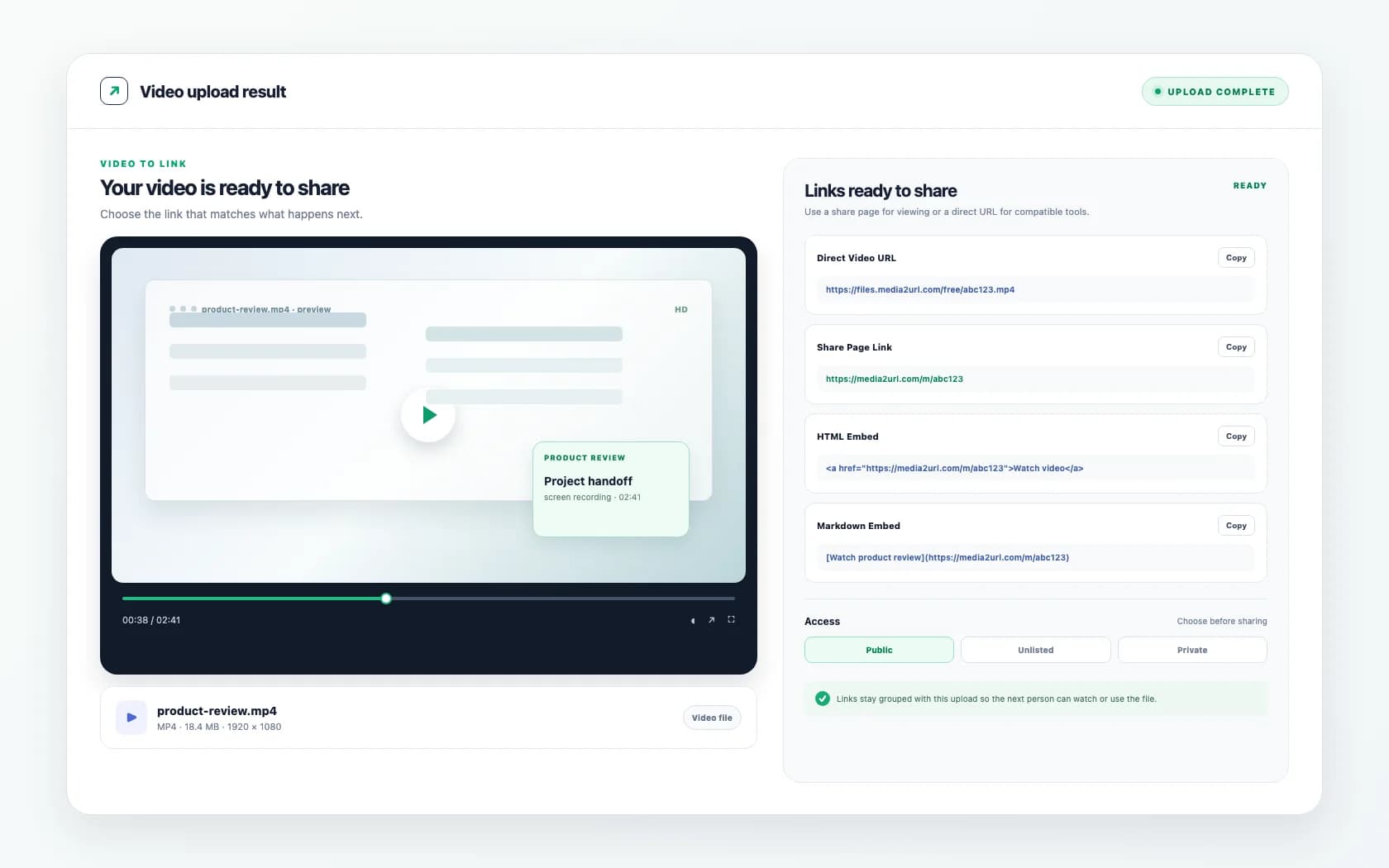
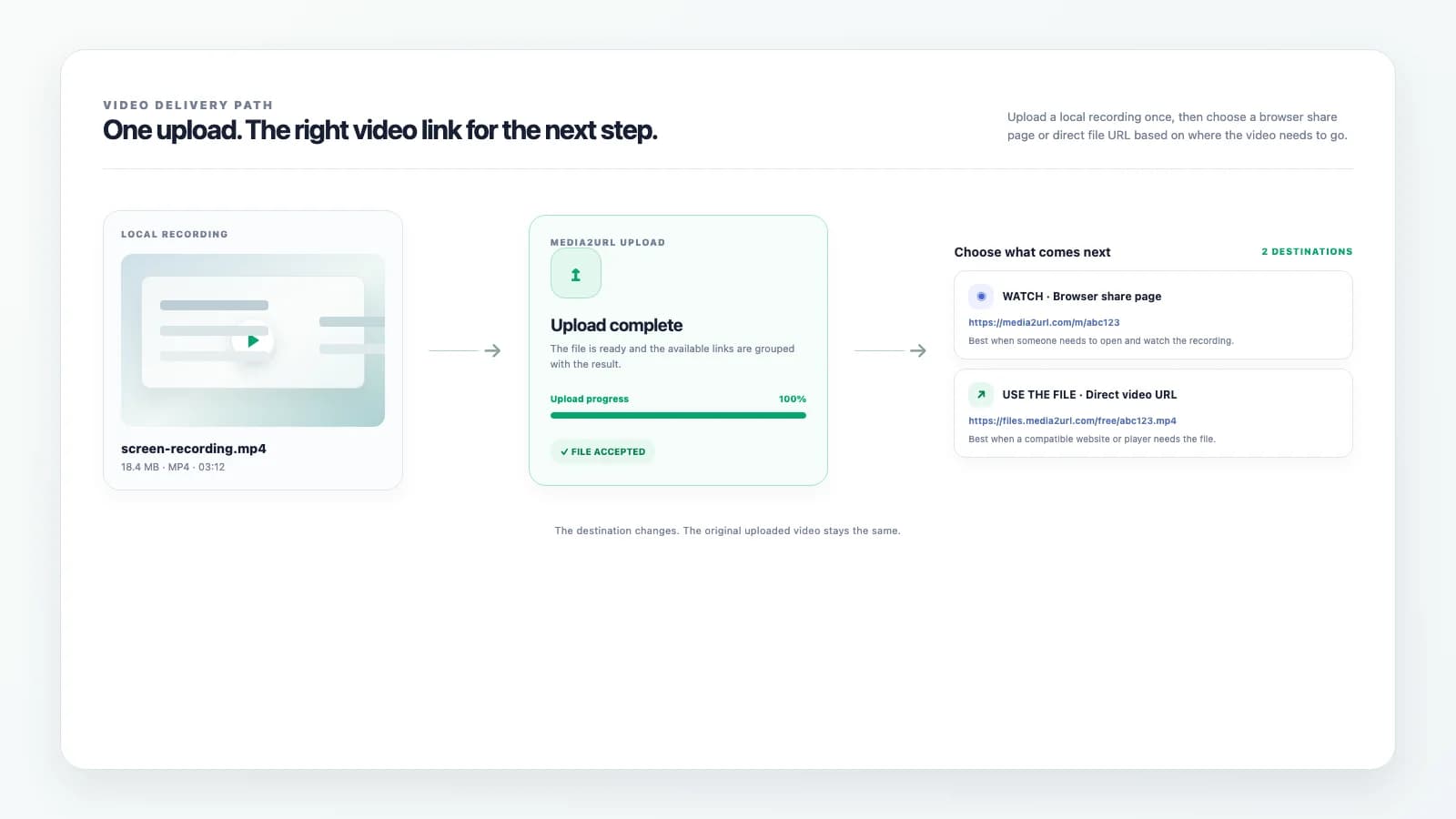
Upload the video through the tool, and the page returns the outputs after processing. You can then copy the direct URL, player share page, QR code, or another supported format from the result section.
Upload MP4, MOV, and WebM files and get a direct video URL, a player share page, privacy control, expiry settings, analytics, and bandwidth limits from one upload flow.
Strict upload policy: do not upload malware, viruses, NSFW content, illegal content, phishing files, executable payloads, abusive content, or copyrighted material you do not own. Violations may lead to immediate file removal, link disabling, account deletion, and permanent bans.
A video usually becomes difficult to share the moment it is ready. The file is too large for email, chat apps do not handle it well, or the next person needs a link that opens cleanly instead of a heavy attachment.
That is where our tool comes in. You upload the video here, choose how open or restricted the link should be, and copy the output that fits the next step.
You do not need to set up hosting before sending the file. You only need to choose the video, pick the privacy setting, select the expiry period, and generate the output.
Once the upload finishes, the video is no longer stuck inside your device. It now has a hosted link that you can share, track, and manage properly.
If you want to test the flow on your own device, try it with a short MP4 clip, a product demo, or a screen recording. That gives you a clear feel for how the player page behaves and which output works better for your actual use case.
A local video file does not come with a public link. The URL appears only after the file is uploaded and hosted.
Using our video to URL converter, you pick the file, upload it, and let the page return the result. The output comes back in a format you can copy right away instead of leaving you to figure out how to turn a video into a link on your own.
This is the simple answer to searches like how to get a URL for a video, upload video to URL, or upload video to link. The video becomes usable online only after it moves from local storage into a hosted video flow.
Choose your MP4, MOV, or WebM video file, configure visibility parameters, and select link expiry.
Our converter processes the video, optimizing chunk pipelines for smooth playback across mobile and desktop.
Copy raw hotlinks, player page links, responsive HTML video embed tags, or scan mobile QR codes.
A single plain link is not always enough once the video has to move across websites, chats, docs, and support workflows. A raw video path works in some places, while a cleaner player page works better in others.
For that reason, the uploader gives you more than one output after the video is processed.
| Output | Best use |
|---|---|
| Direct URL | Raw video access, app fields, technical use |
| Player share page | Chats, docs, support tickets, client sharing |
| QR code | Mobile access and quick scan sharing |
| HTML code | Landing pages, CMS blocks, embedded video sections |
| Markdown code | Documentation, internal notes, supported editors |
| BBCode | Forums and community boards |
With that setup, you do not need to upload the same video again just to get another link format. You upload once, then copy the version that fits what you are doing next.
People search both phrases for almost the same reason, though the expected output changes a little. Video to URL usually points to the raw hosted video path, while video to link usually points to a cleaner shareable video page that opens without confusion.
Our tool covers both. You get the direct video URL for raw access and the player share page for normal sharing, so you do not have to switch tools just because the next step changes.
The difference becomes clear as soon as another person receives the link. A direct video link works well when the system needs the file itself, while a share page feels easier when the person only needs to open the video and watch it.
Points directly to the raw `.mp4` / `.webm` assets on hosted storage. Ideal for HTML <video> tags and internal media fields.
Points to a viewer/player page hosting the video. Ideal for passing clips to teammates, customers, and support threads.
A hosted video link becomes useful only when it fits the place where it will be used. A website may need HTML, a document may need a simple share page, and an internal workflow may only need the direct file URL.
This is why people search for phrases like how to create a link for a video, how to make a video link, or how to turn a video into a link. The real goal is not only to host the video. The real goal is to make the video easy to use in the next workflow without extra work.
Using our tool, you can upload the video here and copy the version that fits. There is no need to host it in one place and rebuild the link somewhere else.
Video links behave differently from image links because the viewing experience changes a lot once playback is involved. A raw file path works in technical cases, but a player page usually feels easier when the video is being sent to a client, a teammate, or a support contact.
The player share page gives the video a cleaner place to open. That helps when the goal is simple viewing instead of raw file handling.
This also keeps the upload more useful for normal users. They do not have to guess what the link will do after opening it because the video appears inside a dedicated player page instead of opening like an isolated file.
Some videos need a public link and long-term access. Other videos only need to stay live for a short review, a product approval, an internal handoff, or a temporary support case.
The uploader lets you decide that before the link is created. You choose whether the video stays public, how long the link remains active, and how tightly access should be controlled.
That gives the upload context from the beginning. A lifetime link works well for long-term resources, while a shorter expiry works better for one-time sharing or limited access.
Analytics help once the video is already in use. You can see whether the link is being opened instead of sending a file into the dark and guessing what happened after that.
Bandwidth control is just as important for video because delivery costs and heavy playback can grow fast. With bandwidth limits in place, the hosting stays easier to manage as usage grows.
Switch links from public preview to private access, or require security passwords for viewing.
Choose lifetimes from 1 day up to 1 year. File links expire automatically according to the rule.
Anonymous uploaders get immediate delete codes to drop files directly after sharing runs complete.
Video uploads come from different workflows, so format support has to stay practical. A screen recording may come through as MP4, a camera export may arrive as MOV, and a browser-friendly asset may already be in WebM.
That is why the uploader needs to support the common formats people already have instead of forcing conversion before the upload even starts. If the current file is an MP4, the flow is simple because you can upload it and get an MP4 link or MP4 URL without changing the format first.
This also helps users searching for MP4 to link or MP4 to URL. They usually do not want another conversion step. They want the hosted result.
The link becomes useful only after the upload is done. It has to fit the place where you want to send it, place it, or keep it.
A direct video URL works well for app fields, internal systems, and places where the raw path is needed. The player share page works better in chats, tickets, docs, and client communication where the person opening the link only needs a smooth viewing experience.
This is where the tool starts saving real time. You can share a walkthrough, send a demo clip, deliver a screen recording, or place a hosted video into a support or product workflow without turning the next step into a manual workaround.
Most video link problems do not start during upload. They appear later when the wrong output gets copied, the video is too heavy for the intended use, or the access settings do not match the person opening it.
A raw direct URL may be copied when a player page would have made the experience easier. In other cases, the link opens but the video cannot be accessed because the privacy setting is too tight or the expiry period has already ended.
There are also cases where bandwidth usage grows much faster than expected. Once the output, privacy, expiry, and bandwidth limits are chosen with the real use case in mind, the video link works much more smoothly.
A single video upload often turns into repeated work. After a few days, the same file may need a better name, a folder, a different expiry, or a replacement without breaking the link already being used somewhere else.
This is where Media2URL becomes more than a video link generator. The upload page solves the immediate video to URL task, while the wider platform helps you manage files, link history, analytics, and access once video sharing becomes part of regular work.
You can begin with one short clip today and still move into a more organized workflow later. That feels much better once video sharing becomes part of demos, support, training, or internal team processes.
Log in to group videos in subdirectories, audit viewer demographics, download analytics CSV sheets, and connect custom domains.
Monitor monthly GB consumption, manage upload quotas, and review completed uploads from the dashboard.
Answers regarding video link formats, upload bounds, and player configurations.
Upload the video through the tool, and the page returns the outputs after processing. You can then copy the direct URL, player share page, QR code, or another supported format from the result section.
Yes. That is exactly what this tool is built for. You upload the video, choose privacy and expiry, and generate the link outputs.
Video to URL usually points to the raw hosted video path. Video to link usually points to a cleaner shareable video page that feels easier in chats, docs, tickets, and client sharing.
The process starts by uploading the file. Once the upload finishes, the tool generates a shareable link that opens a dedicated player page or points directly to the hosted video file.
Sourabha leads storage architecture at Media2URL. Content verified for accuracy regarding CDN replication pipelines, cloud delivery buffering rates, and S3 bucket protection policies.
Most users do not come here because they want to think about hosting. They come here because they need a usable video link and want to get back to the real work.
Using our tool, you can upload the video, choose the right settings, and copy the output that fits your next step. That may be a direct URL, a share page, HTML, Markdown, BBCode, or a QR code, depending on where the video needs to go.