

Google Photos Direct Link: Can You Use It as a Permanent Image URL?

Quick answer
A Google Photos sharing link usually opens a viewing page, so it is unsuitable as a permanent image source for HTML or Markdown. Photos API media URLs are temporary, and copied internal image addresses have no documented permanent hosting guarantee. Keep the original in Google Photos and host a separate web copy you have permission to publish.
In this article16 sections · Jump to what you need
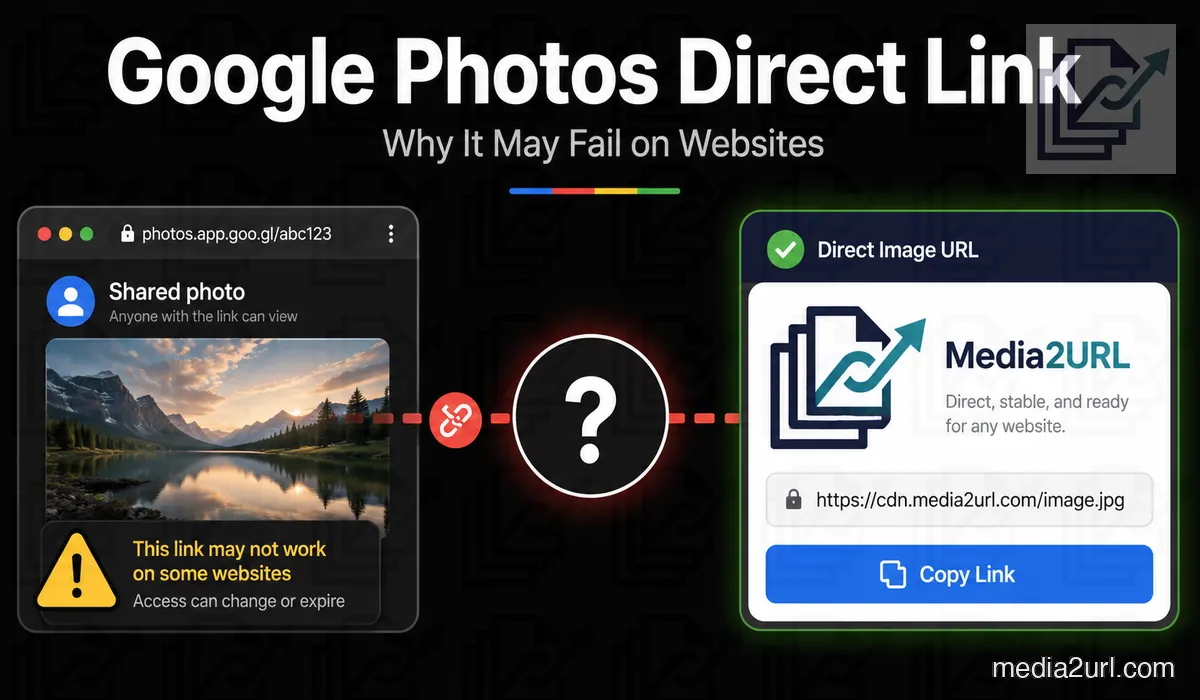
A Google Photos sharing link can work perfectly when you send a photograph to another person, but the same address may fail when you paste it into an HTML image field, Markdown file or website builder. The reason is simple: a normal Google Photos sharing link opens the Google Photos viewing experience rather than acting like a normal hosted image file.
Google Photos is very useful for keeping a personal photo library and sharing photos or albums with other people. Its normal sharing workflow is not designed to provide raw image URLs for external websites, and Google's own Photos API policy says the APIs should not be used as a replacement for website media hosting or a large scale CDN.
If a photograph you own needs to stay inside a website, a cleaner setup is to keep the original in Google Photos and create a separate hosted copy for the web. The personal library and the website copy then serve different purposes.
Why a Google Photos link does not work inside an image field
A Google Photos sharing URL can look like a normal web address:
https://photos.app.goo.gl/example
Opening that address takes you into Google Photos. An HTML <img> element expects something different. The address inside src needs to return the image itself rather than a webpage built around the photograph.
<img src="DIRECT_IMAGE_URL" alt="Photo">
When the URL returns HTML instead of image data, the browser cannot use that response as the requested image. The same problem can appear in Markdown, BBCode, website builders or application fields that expect a direct media URL.
This is why a Google Photos sharing link can be completely valid for sharing and still be the wrong type of link for an image embed.
What Google Photos sharing links are meant for
Google Photos sharing links make sense when another person needs to view the photograph through Google Photos. You might send family photos to relatives, share an event album or let someone open a group of selected images without sending every file separately.
That is different from using the photograph as part of a website. A website image needs a file delivery address that the browser can request whenever the page loads, while a Google Photos share link is primarily part of Google's sharing experience.
Link sharing also means the URL can travel beyond the first recipient. Google notes that people with access to a shared link can view the shared content, and the owner can later turn link sharing off when that access should stop.
Why a copied Google Photos image address is risky for long term use
Opening a photograph inside Google Photos and copying the image address can sometimes produce a URL that looks direct. It may even return the photograph immediately when you paste it into another browser tab.
That does not make every copied Google delivery URL a documented long term hosting address. An address taken from Google's internal delivery system can depend on URL behaviour that was created for Google Photos rather than for an external website.
Google gives a clear expiry rule for one specific type of URL. Media baseUrl values returned through the Google Photos APIs remain active for 60 minutes. Picker API URLs can also stop working sooner when the required permission is revoked, and current Picker API media requests require valid authorization.
The 60-minute rule should therefore be applied to Google Photos API base URLs, not automatically to every browser copied googleusercontent.com address. A copied internal URL may behave differently, but it still should not be treated as a documented permanent website hosting endpoint.
[!IMPORTANT] Google documents Photos API media baseUrl values as temporary URLs with a 60-minute lifetime. A browser copied Google image address is not automatically the same thing as an API baseUrl, but neither should it be assumed to be a supported permanent hosting URL.
Google Photos link types
| Link type | What it actually does |
|---|---|
| Google Photos sharing link | Opens shared content through the Google Photos experience |
| Album link | Lets people view the shared album under its current sharing settings |
| Copied internal image address | May return an image but is not a documented permanent hosting endpoint |
| Photos API baseUrl | Gives temporary media access and currently lasts 60 minutes |
| Direct hosted image URL | Returns the hosted image for normal website use while that asset remains available |
The important difference is not how the URL looks. It is what the server returns when another website requests it.
A Google Photos image can appear to work during your own test
Suppose you paste a copied Google Photos image address into a website and the photograph appears normally. You are signed in to Google, the browser has already loaded the image and nothing seems wrong.
Another visitor opens the same page from a different device and sees an empty image area. The URL may depend on access that is not available to that visitor, or it may no longer return the same media response that your browser received earlier.
Browser caching can make the problem even harder to notice because an image that has already been loaded may continue appearing on your device for a while. Testing the page only from the same logged in browser therefore does not tell you whether the address will work for everyone else.
Test the copied link without your Google session
Open the copied address in a private browser window where you are not signed in to Google.
What the result can tell you:
- Only the image appears: The address is returning media at the time of the test, although that alone does not prove the URL is suitable for long term hosting.
- A Google Photos page appears: The address leads to a viewing page rather than a normal raw image response.
- Google asks you to sign in: The link depends on access that an anonymous website visitor does not have.
- The address no longer works: The source may have expired, changed or become unavailable.
A private window test tells you what you can see, but it does not explain everything happening in the HTTP response. Link Doctor can inspect the status, redirects and final content type when you need to understand why a media URL behaves differently outside the browser.
Can you change a Google Photos URL to make it direct?
Some tutorials suggest copying a googleusercontent.com address and changing the parameters at the end. There is an important distinction here.
Google officially documents width, height and crop parameters for media baseUrl values returned through its Photos APIs. Those parameters can change how an API image is returned, but the underlying baseUrl is still temporary and currently expires after 60 minutes.
That is different from taking a normal Google Photos sharing link or an internal browser URL and trying to turn it into a permanent image host through an unsupported rewrite. A URL trick may work today without giving you a stable publishing contract for the future.
If the photograph is part of a business website, documentation page or product catalogue, the safer workflow is to host a copy through a service that intentionally provides direct website media links.
A cleaner workflow for a website image
Keep the original photograph in Google Photos if that is where you organise your personal library. When the same image needs to appear on a website, download or export the copy you own and upload that web copy to Media2URL.
Once the upload finishes, copy the direct image URL rather than the browser share page when an HTML field, Markdown file or application specifically expects an image source. Open that direct URL in a private browser window before publishing it so you can confirm that the file is available without your account session.
The same image can still have a normal share page when you want another person to open it in a browser. The two URLs serve different purposes, so using the correct one avoids a lot of broken embeds.
<img src="PASTE_YOUR_MEDIA2URL_IMAGE_URL_HERE" alt="Photo description">
If the website needs another image size
A second upload is not always necessary just because the same photograph needs to appear in a smaller card or another website layout. For supported Media2URL images, URL transformations can request another size, crop position or quality while the stored source remains in the library.
WebP or AVIF can also be used for eligible outputs. The Image Editor is still the better choice when the photograph itself needs a visual change such as text, drawing or another content edit.
Can Media2URL import a Google Photos link?
Media Migration can work with supported public source URLs, but the address still needs to return a file that the migration workflow can actually retrieve. A normal Google Photos sharing link often leads to the Google Photos viewing experience rather than behaving like a direct image source.
If you are unsure what the copied address returns, check it with the Link Doctor URL checker. A final text/html response tells you that the URL is reaching a webpage rather than the raw image you were expecting.
Private Google Photos content should not be bypassed. If the photograph is only available through your Google Account, download or export the copy you own and upload it normally.
Never enter your Google password into an external file hosting form simply to make a private photo import work.
What Link Doctor can tell you about the copied URL
A broken embed does not always mean the photograph has disappeared. Sometimes the address is reachable but returns the wrong kind of response for the place where you are trying to use it.
Link Doctor follows redirects and shows the final HTTP status and content type. If a supposed image URL finishes with text/html instead of an image MIME type, you know the address is reaching a webpage rather than acting like a direct image file.
CORS information can also help when the image is being loaded through browser scripts or a tool built around a canvas. Link Doctor cannot make restricted Google Photos content public; it only helps explain what the reachable URL is doing.
Google Photos and Media2URL solve different problems
For the product choice and trade offs, compare Google Photos with Media2URL.
| Requirement | Google Photos | Media2URL |
|---|---|---|
| Personal photo library | One of its main purposes | Not the main purpose |
| Share photos or albums with people | Built for this workflow | Individual hosted file sharing |
| Direct image URL for HTML or Markdown | Not the normal sharing output | Available for supported hosted images |
| Image variants for website layouts | API base URLs are temporary | Supported URL transformations |
| Replace a published hosted asset | Different product model | Supported replacement workflow |
| Restore an earlier hosted version | Different photo library workflow | File history where supported |
| Restricted file sharing | Google Photos sharing controls | Password, expiry and other supported access controls |
| Diagnose an external media URL | No dedicated external link workflow | Link Doctor |
Keep the original photograph in Google Photos
Using Media2URL for the website copy does not mean you need to move your personal photo library away from Google Photos.
Keep the original photograph where you normally organise and back up your photos. Upload a separate copy when that image needs to become part of a website, documentation page or another public web workflow.
This also keeps future changes easier to understand. Google Photos remains the place where the original photo lives, while the hosted web copy can be replaced or adjusted without changing the way you organise the personal library.
The two services are doing different jobs, and keeping those jobs separate is usually simpler than trying to make a personal sharing link behave like website hosting.
Can people reshare the Google Photos link?
Yes. A Google Photos link is meant for sharing, so you should assume that someone who receives the URL can pass it to another person while link sharing remains enabled.
Turning off sharing can stop future access through that shared link, but it cannot remove a copy that somebody has already downloaded or saved. The same limitation applies to any online file once another person has been allowed to view or download it.
Final answer
A normal Google Photos sharing link is useful for showing photographs and albums to other people, but it should not be treated as a permanent direct image URL for HTML, Markdown or website embeds.
Google Photos API media baseUrl values are also temporary. Google currently documents them with a 60-minute lifetime, and its Photos API policy specifically says the APIs should not be used as a replacement for hosting website media or a large scale CDN.
If a photograph you own needs a long term web copy, keep the original in Google Photos and host a separate copy through a service designed to provide direct media URLs. That gives the website its own delivery workflow without turning your personal Google Photos library into the website's image host.
Frequently Asked Questions
Can a Google Photos sharing link work inside an HTML image tag?
Usually not. A normal Google Photos sharing link opens the Google Photos viewing experience rather than returning the raw image response expected by an HTML <img> element.
Are Google Photos API base URLs permanent?
No. Google currently documents Photos API media baseUrl values with a 60-minute lifetime. Picker API URLs may also stop working sooner if the required permission is revoked.
Can I use an lh3.googleusercontent.com URL as a permanent image link?
A copied Google delivery URL may return the image when you test it, but that does not make it a documented permanent website hosting endpoint. Do not apply the API's 60-minute rule automatically to every copied Google URL, but do not build an important website around an internal address whose long term behaviour is not guaranteed either.
Can I change the width or height in a Google Photos URL?
Google documents width, height and crop parameters for Photos API media base URLs. Those parameters change the requested image output, but they do not remove the 60-minute lifetime of the underlying API baseUrl.
Can Media2URL import a private Google Photos image?
It should not bypass private Google Photos access or your Google Account login. Download or export the photograph you own and upload the copy normally when the source is not publicly accessible.
Does uploading a copy to Media2URL remove the original from Google Photos?
No. The web copy is a separate upload. The original photograph remains in Google Photos unless you remove it there yourself.
Should I keep using Google Photos after creating a web copy?
Yes, if Google Photos is where you already keep and organise your personal photographs. The cleaner setup is to leave the original there and use a separate hosted copy only for the website or public workflow that needs a direct image URL.