

Dropbox Direct Link: How dl=0, dl=1 and raw=1 Work

Quick answer
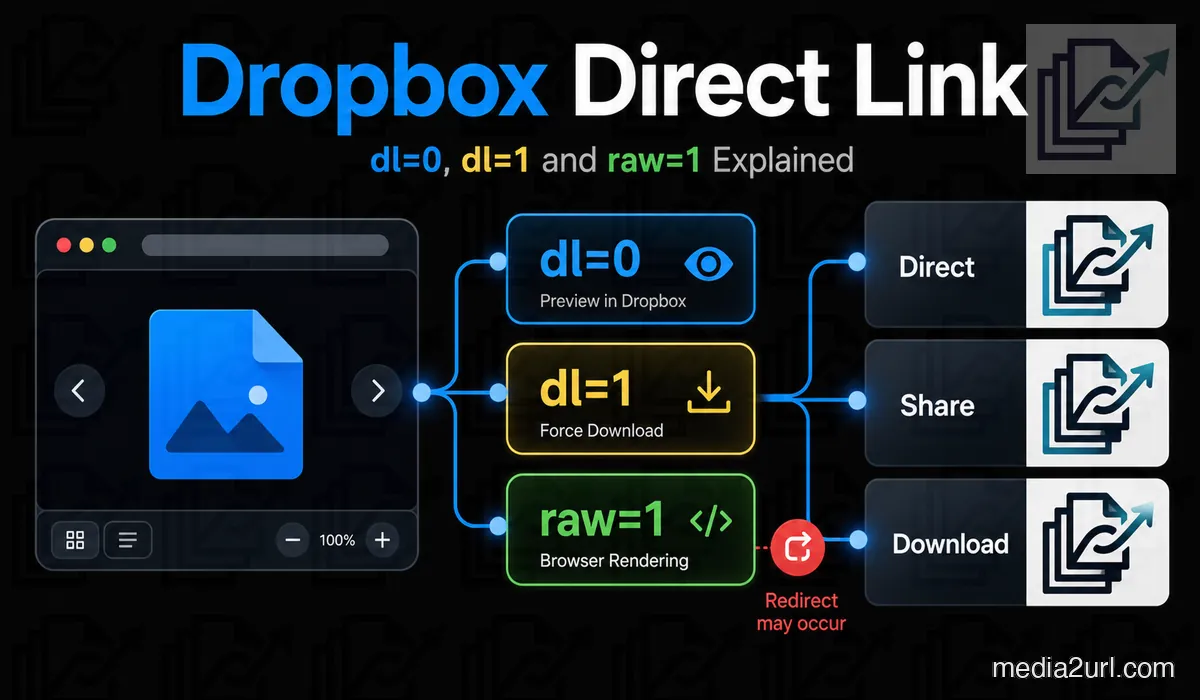
Keep dl=0 for Dropbox’s preview, use dl=1 to request a download, or replace it with raw=1 to render supported content after a redirect. Preserve rlkey and other required URL parameters. Test the link in its intended destination because sharing permissions, redirect support and account bandwidth limits still apply.
In this article12 sections · Jump to what you need
Someone asks you to send a PDF, so you copy its Dropbox link and send it over. A minute later, they ask whether you can send a link that downloads the file instead of opening Dropbox. The PDF is already there. Surely you don't need to upload it somewhere else just to change what happens when they click?
You usually don't. Look closely at the end of your Dropbox sharing URL, and you'll probably find dl=0. Changing that small part of the address lets you request a download instead. There's another option, raw=1, for situations where you want the browser to display supported content without going through Dropbox's usual preview page.
The distinction becomes more important when the link is going into a website rather than an email. Browsers are quite good at following Dropbox's redirects, but not every application handles them the same way.
What those three Dropbox parameters actually do
Let's start with a typical sharing address. Yours will have a different filename and sharing key, but the structure may look familiar.
https://www.dropbox.com/scl/fi/example/photo.jpg?rlkey=example&dl=0
The file path identifies the photograph, while the rlkey is part of the sharing address. The part we're interested in is right at the end: dl=0.
That tells Dropbox to open its regular preview. The recipient can see the photograph or document through Dropbox's own viewing page, along with whatever controls are available for that file.
There are three parameters worth knowing.
| Parameter | What Dropbox does |
|---|---|
dl=0 | Opens the usual Dropbox preview. |
dl=1 | Requests a download instead of the normal preview. |
raw=1 | Bypasses the preview and asks the browser to render supported content after a redirect. |
None of these changes the file stored in your account. You're changing what the shared link asks Dropbox to do, not creating another photograph or editing the original document.
One detail is easy to overlook when copying examples from the internet. Your link may contain other parameters, especially rlkey. Keep those intact when editing the address.
A download link takes one small change
Let's return to that PDF. Perhaps it's an application form, or maybe you're adding a button to your company's website so visitors can save a brochure.
The usual Dropbox preview isn't necessarily useful in either situation. You'd rather have the download begin when the recipient opens the address.
If you're starting with a finished brochure file and want a new hosted PDF address, host the finished PDF as a shareable link.
Here's the original link:
https://www.dropbox.com/scl/fi/example/report.pdf?rlkey=example&dl=0
Change the final zero to one:
https://www.dropbox.com/scl/fi/example/report.pdf?rlkey=example&dl=1
Dropbox now asks the browser to download the shared file.
Keep the existing question mark and ampersand in the correct places. In this example, rlkey is already preceded by a question mark, so the dl parameter comes after an ampersand. You aren't replacing the entire query string.
There's no need to add another dl=1 elsewhere in the same address, either. If the link already has dl=0, edit that existing parameter.
For an occasional document download, this may be all you need. The file stays in Dropbox, and the recipient gets a link intended for saving it.
The image problem is slightly different
Downloading a PDF is straightforward enough, but photographs introduce another use for Dropbox links.
Say you've uploaded a product photograph for a colleague. Later, you decide to put the same picture into a blog post. Since it's already online, you copy the Dropbox address and paste it into your website's image field.
The preview link isn't necessarily suitable. Your website wants image content, not a Dropbox webpage containing the photograph.
Try replacing dl=0 with raw=1:
https://www.dropbox.com/scl/fi/example/photo.jpg?rlkey=example&raw=1
Dropbox documents this parameter as a way to bypass its normal preview and let the browser render supported content. An image can therefore be displayed without taking the visitor to Dropbox's viewing page.
For an HTML webpage, you could try the modified address like this:
<img
  src="https://www.dropbox.com/scl/fi/example/photo.jpg?rlkey=example&raw=1"
  alt="Product photograph"
>
Test it on the actual webpage before publishing. It's possible for the photograph to appear when you click the link directly but fail inside the website builder you're using.
Why the redirect can cause trouble
There's something unusual about raw=1: the first Dropbox address doesn't necessarily return the image itself.
Dropbox says this parameter causes an HTTP redirect. Your browser follows that redirect to the address where the content is served, usually without drawing attention to what happened.
An importer or another application may not do the same.
For example, an image import field might expect an immediate image response from the address you've entered. If it doesn't follow Dropbox's redirect, the import can fail even though the photograph appears perfectly well when you open the link in Chrome.
That doesn't make every Dropbox raw=1 link unusable. It means the application receiving the URL needs to handle redirects.
It's worth testing this before adding the link to several pages. If it fails, repeatedly changing the filename or adding more URL parameters won't solve an application that can't follow the redirect.
Your own Dropbox account may be hiding the problem
There's another reason a link can work for you and fail for everyone else. Your browser may already be signed in to the Dropbox account that owns the file.
Try copying the modified link into a private browser window. If it opens a sign in page or displays an access error, check how the original file was shared.
Dropbox allows files to be shared with different levels of access. A document intended only for members of your team won't become public because you've changed dl=0 to raw=1. The same applies to files protected by a password or shared links that have expired.
Eligible Dropbox paid plans include extra sharing controls. Professional, Essentials, Standard, Advanced, Business, Business Plus and Enterprise were among the plans listed for password protection and link expiry in the documentation used for the original guide.
If you're uploading a new document for a short handoff rather than editing an existing Dropbox link, the temporary file upload workflow lets you choose an available expiry option at the start.
Some eligible plans also let you disable downloads. That removes the usual download option from the Dropbox sharing experience, although it doesn't guarantee that somebody can't save content they've been allowed to view.
If an image stops appearing without any changes to your website, it's worth checking the Dropbox account as well. The file may have been deleted, the owner may have changed its access or Dropbox may have interrupted the shared link.
What happens when a lot of people open the link?
A Dropbox link shared with a few colleagues doesn't create the same demands as an image displayed on a busy public website.
Think about a photograph in the header of a popular article. Each new visitor may cause their browser to request that image. Even though nobody is deliberately downloading it, the traffic still uses the Dropbox account's sharing allowance.
Dropbox publishes daily limits for shared files. The figures recorded in the original guide, reviewed in August 2026, were:
| Dropbox account | Daily bandwidth | Download allowance |
|---|---|---|
| Basic accounts and trials | 20 GB | Up to 100,000 |
| Plus, Family, Professional, Essentials, Standard and Business | 1 TB | Unlimited |
| Advanced, Business Plus and Enterprise | 4 TB | Unlimited |
These are sharing limits for the account. Check Dropbox's current plan documentation before depending on a particular allowance, since the company can revise its limits.
If an account exceeds its sharing allowance for the first time, Dropbox says the affected sharing activity is normally paused for 24 hours. Repeated problems can lead to longer interruptions.
Now consider what that could mean for your website. The photograph may look fine while you're preparing the article, but an unexpected increase in visitors could make the shared file temporarily unavailable.
For ordinary documents and occasional file sharing, you may never run into this problem. A public image that receives requests throughout the day is another story, especially if the file is large.
Changing the link to raw=1 won't increase the account's bandwidth allowance. It only changes how Dropbox serves the shared file.
Can Dropbox display an entire HTML website?
It's tempting to take the idea a little further. If raw=1 can display an image, perhaps uploading an HTML file and adding the same parameter will let you publish a complete webpage.
Dropbox doesn't support that use through its shared links.
Its documentation states that shared HTML files aren't rendered as ordinary webpages. You can still store and share the HTML file, but a modified Dropbox sharing URL doesn't turn it into website hosting.
A photograph displayed inside an existing webpage is a different job from serving the webpage itself. If you've built an HTML project and want people to visit it as a website, you'll need hosting that supports publishing HTML content.
Media2URL's HTML to URL publishing tool is designed for turning a supported HTML project into a hosted page.
When the link looks right but still fails
Rather than guessing at URL parameters, it helps to see what Dropbox is actually returning.
For example, a raw=1 photograph may open in your browser but fail when an online tool tries to retrieve it. You'd want to know whether Dropbox is redirecting the request, whether the final address works and whether it returns the expected image.
You can inspect a URL's response headers from Terminal:
curl -I -L "YOUR_DROPBOX_URL"
The -I option requests the headers, and -L follows redirects.
Check the final HTTP status and content type. A successful request for a JPEG photograph would normally end with a response identifying JPEG content, rather than an HTML page containing an error message.
Keep in mind that the command makes a HEAD request. Some servers handle HEAD differently from GET, so an unusual result should be checked against a normal request before you decide the file link is broken.
For supported public addresses, our Link Doctor offers another way to inspect the response.
It follows redirects and shows the HTTP status, redirect path and final content type. You can use that information to see whether Dropbox is eventually returning the file you expected.
There's more to check if the URL is being used inside a particular type of application. A browser editor, for instance, may need permission to read the pixels of an external image through JavaScript. Link Doctor can inspect relevant CORS behaviour, while its byte range checks help investigate how supported audio and video URLs respond to requests for part of a file.
The tool won't make a private Dropbox document public or restore a deleted file. It tells you what an accessible URL is doing so you have a clearer idea of where the problem begins.
Avoid entering private signed addresses or credentials into unrelated public URL checkers. A link that grants access to a restricted file isn't something you want to share casually.
Keep the working file in Dropbox if that's where it belongs
There are plenty of reasons to continue using Dropbox even when you need a different arrangement for publishing files.
Your team might store its design originals there, share documents between computers or work from a set of common project folders. Moving all those files simply because a website needs a direct image URL would create unnecessary work.
Sometimes the modified Dropbox link is enough. If raw=1 works in the destination and the file receives modest traffic, another hosted copy may not offer much benefit.
The situation changes when you want to manage the published version separately from the original.
A company might keep its product photographs in Dropbox while needing smaller images for mobile visitors and larger ones for the desktop version of its website. Changing a Dropbox sharing parameter won't create those different sizes. It returns the existing file through a different delivery route.
A separately hosted Media2URL image can use supported URL transformations to request different dimensions and quality settings. Available fit and crop controls can help when the same photograph needs to appear in different website layouts.
The original Dropbox photograph can stay exactly where the team left it.
Bringing a file into Media2URL
For supported files, Media Migration can import content from accessible source URLs and available cloud storage sources.
The Dropbox file must be accessible to the migration process, and you need permission to host it elsewhere. A private document protected by team permissions or a password shouldn't become accessible merely because somebody tries to import its URL.
Once the file is imported, the Media2URL copy becomes a separate hosted asset. Removing or changing that copy doesn't mean the original Dropbox file has been moved out of your account.
Larger imports can benefit from duplicate checking. Where source mapping is available, you can also keep a record of the old address alongside its new Media2URL URL. That makes it easier to identify which references need updating when an existing website contains many file links.
Think about printed links before changing hosts
There's one publishing problem that's difficult to fix after the fact: a URL that's already printed on something.
Suppose your company has created a QR code for its product catalogue. The code points straight to a Dropbox PDF, and you've printed it on packaging that's already being shipped to customers.
You can change how the Dropbox link behaves by using dl=1 or raw=1, but moving the catalogue to a completely different address doesn't change what those printed QR codes contain.
The same problem can appear with links already placed in brochures or old email campaigns.
For documents that are likely to change, it's useful to decide how the public address will be maintained before distributing it widely.
Media2URL supports replacing eligible published assets while keeping their managed URL unchanged. Available version history also lets you return to an earlier supported version if a replacement needs to be reversed.
A separate hosted copy can therefore be useful for a catalogue that receives regular revisions. Dropbox can continue holding the team's working document, while the published version has its own link and replacement process.
There is a limitation worth remembering: an existing QR code that points directly to Dropbox won't automatically point to Media2URL after an import. To change that destination without replacing the printed code, you would need to control a redirect or another suitable arrangement at the original address.
For more detail on the different publishing workflows, see our Dropbox vs Media2URL comparison.
So which Dropbox link should you copy?
If someone wants to view a document through Dropbox, there's usually no reason to change dl=0. When they want to save the file, dl=1 requests a download. And if you're trying to display supported content without the normal preview, raw=1 is the option to test.
Pay attention to where that last link will be used. Dropbox's redirect is usually invisible in a browser, but the application receiving your URL still has to handle it correctly.
For ordinary sharing, those small URL changes may solve the problem without another upload. When a file becomes an important public website asset, there's more to consider than how the link opens. Its access permissions and the account's sharing allowance still apply.
Frequently Asked Questions
Can I change a Dropbox sharing link into a direct image URL?
For supported images, replace the existing dl parameter with raw=1. Dropbox then asks the browser to render the image without its normal preview, although the request still passes through a redirect.
Why does a Dropbox raw=1 image open in Chrome but fail in another application?
The application might not follow Dropbox's redirect. Check that first, then look at the file's sharing permissions and whether Dropbox has temporarily interrupted access to the link.
Should I remove rlkey when changing the URL?
No. Keep the original sharing key and other required parts of the address. Change only the parameter responsible for the requested preview, download or rendering behaviour.
Can I use raw=1 to host an HTML website?
No. Dropbox doesn't render shared HTML files as normal hosted webpages. The parameter is intended to request supported file content without the ordinary Dropbox preview.
Related guides
If you're unsure why a URL works in your browser but fails inside another website, read our Direct File Links guide. It explains the difference between an address that returns the actual file and one that opens a webpage containing it.
The image link troubleshooting guide covers other reasons pictures refuse to display. For a closer look at the different link types available after publishing a file, see Direct URL vs Share Page URL.