
When Is a Share Page Better Than a Direct URL?

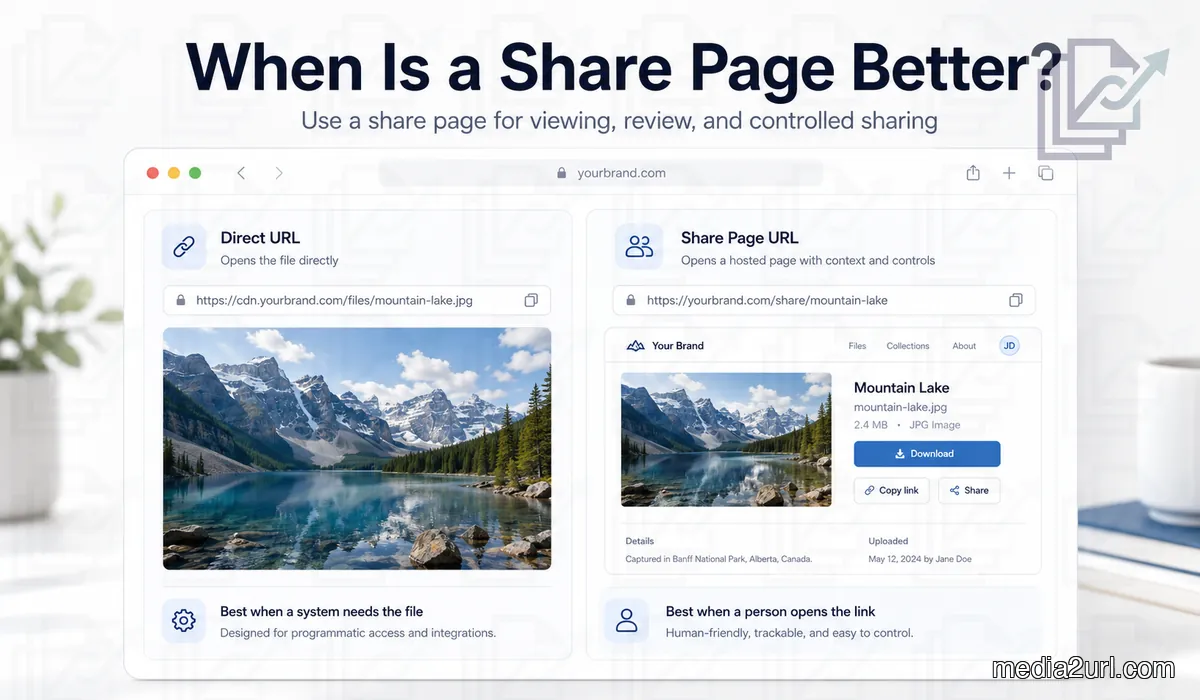
If you are sending the link to a person, a share page is usually the right choice. If you are pasting the link into a website, Markdown file, app, or some field that needs the actual file (such as our image to link or file to link setups), then the direct URL is the one you should copy.
That is the real difference. A direct URL is for loading the file itself. A share page opens a page around the file, and in many normal situations that page is the useful part.
A lot of people assume the direct URL is always the right link because it looks technical and goes straight to the file. I used to think the same thing, but that only makes sense when the next place needs the raw file. For a broader overview of how web addresses point to media, read our explanation of what an image URL is. When the link is meant for a person, the page around the file can make the handoff comfortable.
When a share page makes more sense
You see this in very ordinary situations. You are sending an image to a client, a teammate, or someone in chat, and you want them to open it without any friction.
In that case, a share page helps because the person lands on a normal page with the image, file name, viewing area, and usually a download option too. A direct URL can open the file, but it gives no context at all.
That difference shows up very quickly once someone else opens the link. If the other person is not technical, a bare file link can look abrupt or confusing, while a share page tells them what they are looking at and gives them a comfortable place to view it.
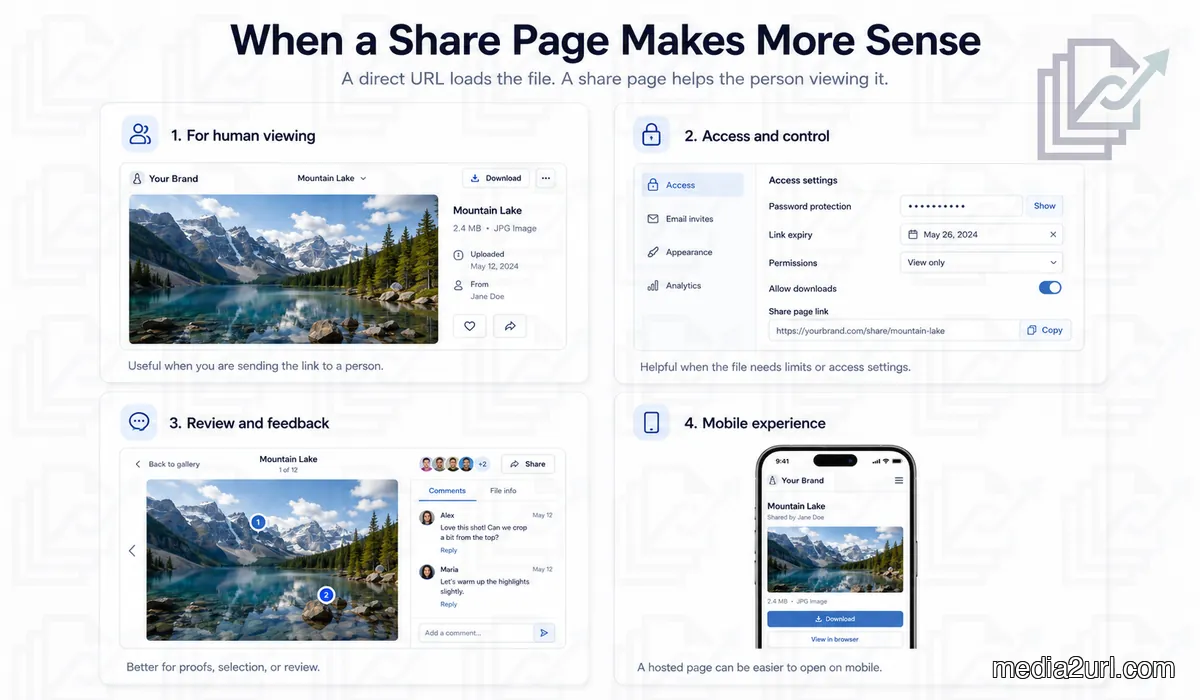
When you need more than just “open the file”
Sometimes the file is not just being sent for viewing. You may want to control who can open it, whether they can download it, or how long the link should remain active.
That is one place where a share page fits the job in a direct and useful form. A share page can carry permissions, expiry settings, or a controlled viewing setup that a raw file link usually does not carry.
You see this a lot in client work and team work. You are not only sharing a file. You are deciding how that file should be opened and what the other person should be able to do with it.
Note: Advanced file control features like custom expiration times, access settings, and tracking require the structured environment of a share page wrapper rather than a raw, direct asset URL.
When the page around the file is actually useful
A lot of blog posts talk as if the page around the file is unnecessary. That is only true when the next step is embedding the file somewhere.
If you are sharing the file with a person, the page can do useful work. It can show the preview, the file name, the owner, the folder context, the download option, and in some tools even comments or review controls. If you've ever had problems loading these embedded files, read about why image links break on websites to see how layout pages fail when pasted directly as source links.
You see this very clearly in creative work. If you send a photo set, design draft, or proof file, a hosted page supports the handoff well, while a raw file opens on its own with no explanation around it.
When the other person is opening the link on a phone
This is one of those details people usually ignore until it creates friction. A direct file link may be technically correct, but that does not mean it gives a good experience on a phone.
A share page tends to work well on mobile because it gives the person a normal viewing screen, download controls people can spot, and a layout that makes sense on a small display. A raw file link can be fine in some cases, but on a phone it can also make the whole thing look awkward or incomplete.
If your real goal is not just to send the file but to help the other person open it without getting stuck, the share page usually fits that situation well.
When someone has to review, not just view
This is another place where direct URLs start losing their appeal. If the other person only needs to open the file once, a raw link may do the job.
But if they have to review it, compare versions, choose an option, mark favourites, or give feedback, the share page does much more for the task. The page gives them a place to look around, understand the file, and interact with it in a form a direct URL does not support.
That is why a hosted page suits proofs, selections, galleries, and client reviews so well. The file is only one part of the job. The interaction around it is part of the job too.
When you are sending something finished
There is also a very practical delivery case here. Sometimes the file is done, you are not collaborating anymore, and you just want to hand it over in a tidy form.
A share page works well in that situation because it gives the recipient a stable place to open the file, view it, and download it. That avoids the abrupt feel of dropping them into a raw file with no surrounding context.
This is common with contracts, final images, exported videos, presentation files, and anything else where the job is delivery, not embedding.
When a direct URL is solving the wrong problem
A direct URL can look attractive because it is short, technical, and goes straight to the file. That does not automatically make it the right choice.
If the next person needs context, access control, a preview screen, or a viewing experience that guides them, then the direct URL solves the wrong problem. It is useful for loading the file. It does not do much for presenting it.
This is why people get confused after testing both links in a browser. Both open something. Both seem valid. For a direct comparison side-by-side, check out our guide on direct URL vs share page URL. The real difference only shows up when you think about what the next person actually needs.
A practical way to decide
Before you copy any link, ask yourself one thing. Is the next step about loading the file, or is it about opening the file for a person?
Use the share page URL when:
- a person is going to open the link
- you want the file to open inside a viewer or hosted page
- you need permissions, expiry, or some control around access
- the person may need a smooth mobile experience
Use the direct URL when:
- a website has to load the file itself
- you are using HTML or Markdown
- a CMS field needs the raw source link
- an app or tool has to fetch the file from the URL
That one check removes most mistakes before they happen.
Where people usually choose the wrong one
The wrong link gets copied so many times because the labels are vague. One button says Copy Link, another says Share, another says Open, and nothing makes the difference obvious unless you already know what you are looking for.
So the mistake is not always carelessness. In many cases, the link that looks most natural to copy is the one built for viewing, while the link you needed for embedding is hidden under something like file URL, direct link, or raw link.
That is why the same upload can give two links that both look right at first and only show their difference later.
- Ideal format for sharing assets with clients and teammates
- Provides necessary context (filename, size, folders)
- Supports advanced settings (expiry, access controls)
- Great mobile device layouts with explicit download buttons
- Fails when used inside HTML image tags or Markdown embeds
- Introduces navigation and page layouts when you only want the raw asset
- Adds an extra step for programmatic API workflows
Final thought
A share page is the right pick when the link is meant for a person and the page around the file adds something useful. That useful part may be context, access control, mobile-friendly viewing, comments, download options, or just a comfortable handoff.
Once you start looking at it like that, the choice stops feeling confusing. A direct URL is great when a system needs the file. A share page fits well when a person needs the experience around the file.
Frequently Asked Questions
Find quick answers regarding direct links, preview pages, and HTML/Markdown embedding rules.
When is a share page better than a direct URL?
A share page is better when sending links to people. It provides context, download options, permissions, expiry controls, and works better on mobile compared to raw file URLs.
When should I use a direct URL instead?
Use a direct URL when embedding files into a website, a blog using HTML/Markdown, a CMS image field, or any application/tool that needs to fetch the raw file itself.
Why does mobile phone viewing benefit from a share page?
A share page provides a responsive viewer interface with explicit download controls, making it much cleaner and easier to navigate on small displays than a bare file.
Can I add security controls or expiry limits to a direct URL?
No. A raw file link points directly to the asset. Expiration rules, access settings, and view statistics are managed and presented via the share page wrapper.