


Uploading the image is often the easy part. The confusing bit comes a few seconds later when the result screen gives you two or three links and every one of them seems to work.
One says Direct URL. Another says Share or View. There may also be a normal Copy link button sitting in the most visible place.
You open the first link and see the image. Then you open the second one and see the same image again.
At that point, it is natural to think the difference is mostly in the label. It is not.
The problem usually appears only when that URL leaves the upload page and goes somewhere else. A link that looked completely fine in your browser may fail inside an HTML image field. Another link may be perfect for sending to a client but awkward when a website tries to use it as an image source.
The same file is behind both links. What changes is what the link is expected to do.
While working on Media2URL, this was one of the things we had to keep separate from the beginning. Someone putting an image into a website is not doing the same thing as someone sending that image to another person for review, even though both of them start with the same uploaded file.
That difference is really what Direct URL and Share Page are about.
Start with where the link is going
Suppose you upload a banner for a client campaign.
The developer wants to place that banner inside the website. A few minutes later, the client asks to see the same banner before the page goes live.
For the developer, the important thing is that the website can load the image.
For the client, the important thing is that the link opens properly and gives them a sensible way to view the file.
Those are two different jobs.
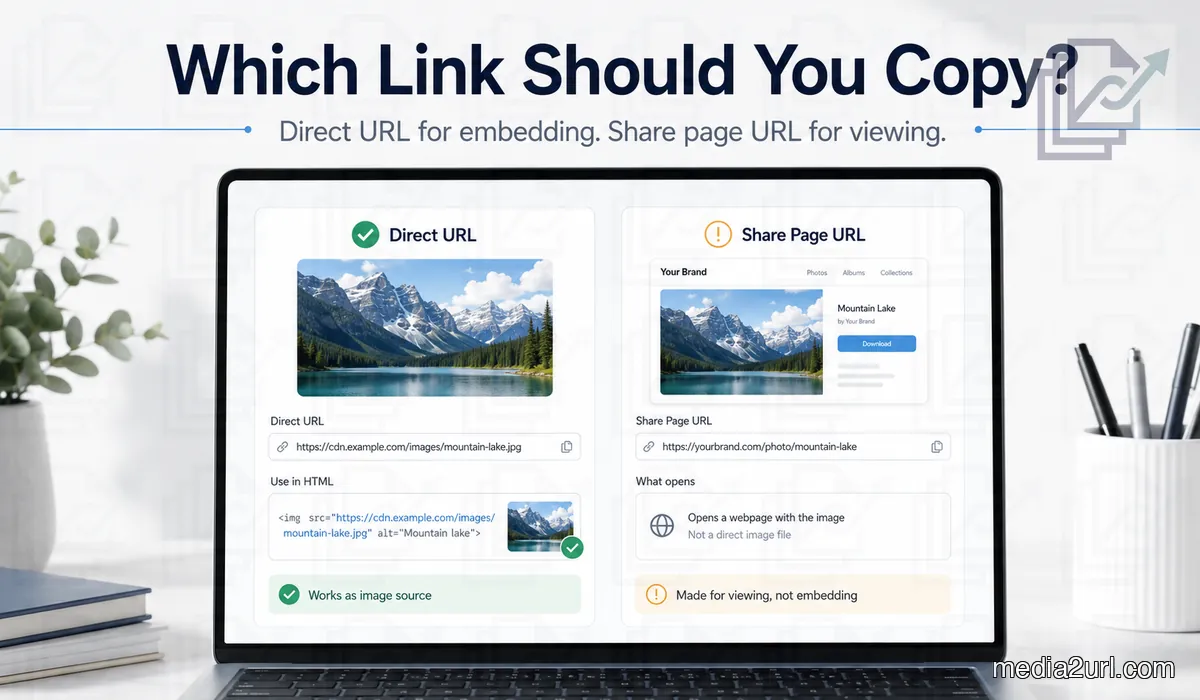
A direct image URL is the one you normally want for something like this:
<img src="https://cdn.example.com/media/campaign-banner" alt="Campaign banner">
The browser sees the address inside src and tries to load an image from it.
It is not looking for a page that contains an image. It is trying to get the image itself.
Now imagine a different address:
https://example.com/view/campaign-banner
Opening that link might show the exact same banner. But there could also be a filename above it, a Download button below it, perhaps some branding, and other controls around the file.
For a client, that page may actually be nicer.
For the <img> element, it is a different kind of response.
That is why the quickest way to choose is not to ask which link looks more official. Ask what is receiving the URL next.
Why the wrong link still looks correct in your browser
This is the part that catches people.
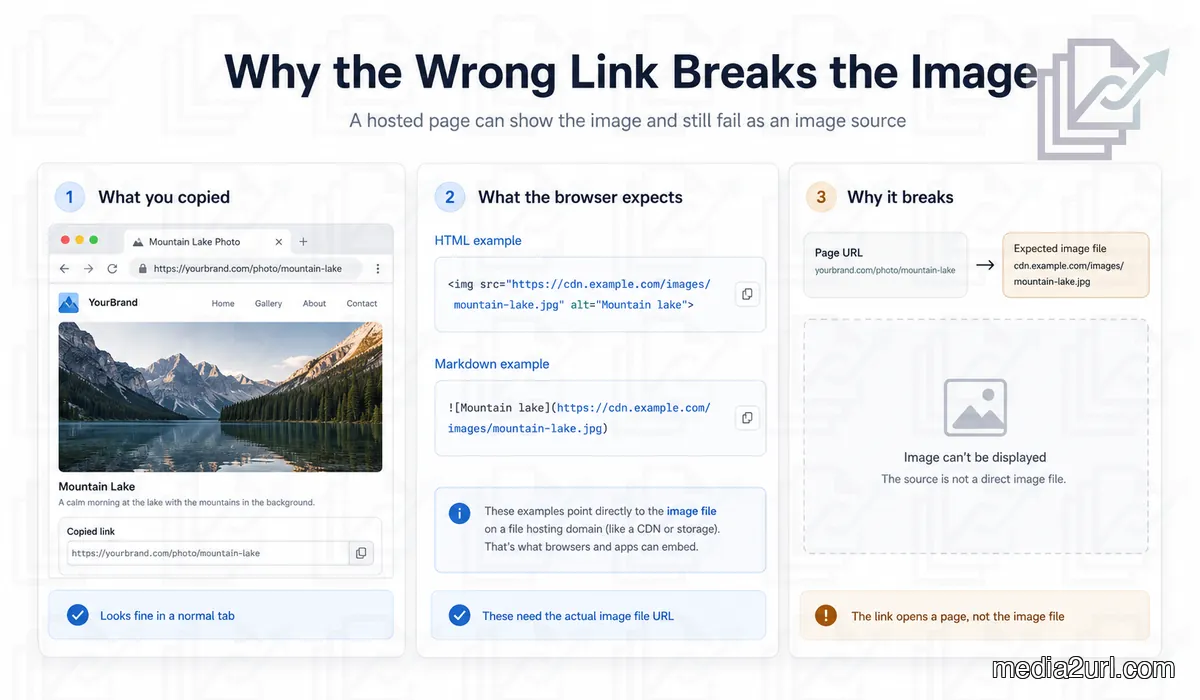
A normal browser tab is happy to open a webpage.
If the page contains your image, you see the image and assume everything is okay. There is no obvious warning saying, “This is a viewing page, not the image source you should paste into HTML.”
So the link passes your first test.
Then you put it here:
<img src="YOUR_LINK" alt="Product image">
and the image disappears.
Nothing mysterious has happened. The browser tab and the image element were asking for different things.
The tab could display the whole page.
The image element needed an image.
Markdown can create the same confusion:

If YOUR_IMAGE_URL opens a page around the image rather than providing the image itself, the Markdown renderer may not show what you expected.
This is also why I would not keep testing the same link by opening it in new tabs. Once or twice is enough.
If the link is meant for HTML, test it in HTML.
If it is meant for Markdown, test it there.
A website builder with an Image URL field should be tested inside that field.
That tells you much more than simply proving that Chrome can open the address.
The URL does not need to end in .jpg
Another common mistake is looking at the URL itself and trying to guess what it is.
This one looks like an image:
https://example.com/photos/banner.jpg
This one does not:
https://files.example.com/f/8dk29qmx
But the second address can still be the direct image URL.
A hosting service does not have to expose the original filename in the public address. It can use an internal identifier and still return the correct image when the request reaches the server.
So .jpg, .png, or .webp at the end is not the test.
In fact, an address can look exactly like a file URL and still lead somewhere else.
What comes back from the request is more useful than what the URL looks like.
This becomes especially common once content delivery networks are involved, since the public address does not always resemble the original uploaded filename at all.
Sometimes the share page is actually the better link
Direct URLs are useful, but I would not call them the better link in general.
Imagine you send a client four versions of a homepage banner.
If every URL opens only the raw image, the client can still view the work. But the experience may be rather bare, particularly when the files look similar.
A share page can give them more context around the file. They may see the filename, a preview, and a Download option on the same page.
That can be more comfortable when a person is reviewing something.
Meanwhile, the developer working on the website still wants the direct image URL.
Same banner. Same upload.
Different people need different links.
This is why Media2URL keeps the direct file output and the share page separate instead of pretending one URL can be the best choice everywhere.
Why Copy Link causes so much confusion
The largest button after an upload is often Copy link.
It is hard to blame anyone for clicking it.
For normal sharing, that button probably does exactly what it should. The hosting service assumes you want to send the file to somebody, so it gives you a link that opens a viewing page.
The problem comes when you uploaded the image for a different reason.
Maybe WordPress is asking for an image URL. Maybe you are writing Markdown. Maybe another tool expects the media itself.
In that situation, the biggest button on the page can still be the wrong choice.
The direct address may be sitting somewhere else under a smaller label such as Direct URL or File URL.
There is no naming rule followed by every hosting service. That is why the label alone is not enough.
You have to look at what the destination expects.
One image can use both links on the same day
This happens all the time in a normal workflow.
A design team finishes a campaign banner in the morning. The developer gets the direct URL and places the banner inside the landing page.
An hour later, someone from the marketing team needs to send the final asset to the client.
There is no reason they must use the same address.
The marketing person may send the share page because the client is opening the image in a browser and reviewing it as a person.
Later, another person might need to download the original asset.
Now a download link can make more sense.
Nothing about the uploaded file changed through any of this.
Only the next action changed.
Once you start thinking that way, the different links feel much less repetitive.
When the link type is correct but it still does not work
Choosing the Direct URL answers one question: does the next website need the file itself rather than a page around it? A correct direct URL can still fail because of access rules, an expired address, a redirect or restrictions on use from another website.
At that point, comparing Direct URL and Share Page again will not solve the problem. The Direct File Links guide explains redirects and file delivery behaviour across different formats, while the image troubleshooting article covers the case where an image opens normally but disappears when a website tries to use it.
Keep the two decisions separate. First choose the kind of link the next place needs. If that link still fails, troubleshoot the delivery problem itself.
Public and private are another decision entirely
People often mix these terms together:
- Direct URL
- Share page
- Public link
- Private link
They are not four points on one scale.
Direct URL and Share Page describe what kind of destination you are using.
Public and Private describe who should be allowed to get there.
A share page can absolutely be private.
A client may receive a normal page around the file but still need permission before they can open it.
A direct image URL can be public when that image belongs on a public website.
That is normal too.
If visitors are supposed to see the image, their browsers need a way to retrieve it.
So copying the direct URL does not automatically mean you have made the file public, just as choosing a share page does not automatically make something private.
If access is the part you are trying to decide, the Public Link vs Private Link guide is the better place to continue.
Where the download link comes in
A third output often appears after an upload: Download.
Its purpose is a little easier to understand.
Suppose a button on your site says:
Download brochure
The visitor already knows what should happen next.
They want the file.
Using an output intended for that action makes sense.
Now imagine emailing the same brochure to somebody who is reviewing it before it gets published.
The share page may be nicer because they can view it first and then choose what to do.
This is another example of one uploaded file being used in completely different ways without needing to be uploaded again.
How we approach this inside Media2URL
When we were working through this part of Media2URL, one thing was obvious quite early: people do not upload files just for the sake of getting a URL.
The URL is going somewhere.
Maybe it is being pasted into a website.
Maybe a client will open it.
Maybe someone needs to download the original.
Those are different jobs, so trying to force all of them through one generic link would create unnecessary confusion.
For supported uploads, Media2URL therefore keeps the direct file URL and the share page as separate outputs.
The direct URL is useful when another website or application needs the media itself.
The share page is for the situation where somebody should open a normal page around the file.
A download output makes sense when saving the file is the next action.
This also means you do not have to keep creating extra uploads just because the same image is being used in more than one place.
What if the image only exists on your computer?
A local file path is not a public image URL.
Something like this:
/Users/name/Desktop/banner.png
works on your computer because your computer knows where that file is stored.
A visitor on another device has no access to your Desktop folder.
The image needs to be hosted somewhere that can serve it through the internet first.
That is what Image to Link is for.
Upload the image, then copy the link that fits the next task.
There is no special trick that turns a path on your laptop into a usable public image address without putting the file somewhere reachable.
The missing step is hosting.
A smaller version of the same image is a different question
Once the direct image URL is working, you may discover that the original file is too large for part of your website.
That does not necessarily mean you need another manual upload.
For supported Media2URL images, URL transformations can provide another supported size or format, including eligible WebP or AVIF output.
I would deal with this after the link itself is sorted.
First make sure the website is receiving the correct image.
Then think about the size or format the page actually needs.
They are related parts of the same media workflow, but they are not the same problem.
So which link should you copy?
If you are still unsure after an upload, do not start by comparing how the URLs look.
Look at the place you are about to paste the link.
A website image field normally needs the direct media.
A person reviewing the file may prefer the share page.
A download button should use the output intended for saving the file.
And when the link still behaves in a way you did not expect, test it there, in the actual destination.
That is much more useful than opening the same URL in another browser tab and confirming once again that you can see the image.
The link should follow the job.
Once that becomes the habit, Direct URL and Share Page stop looking like duplicate options and start making sense as two different ways to use the same uploaded file.
Frequently Asked Questions
What is the difference between a direct URL and a share page URL?
A direct URL is meant for places that need the hosted file itself. A share page opens a webpage around the file, which is generally more useful when a person is opening and viewing it.
Which URL should I use in HTML?
Use the direct image URL when an <img> element needs to load the image. A share page may open normally in your browser while still giving the image element a webpage instead of the media it expects.
Which URL should I use in Markdown?
Markdown image syntax normally needs the direct image source. If you want somebody to open the share page instead, use it as a normal clickable link rather than as the image source.
Does a direct URL need to end in .jpg or .png?
No. A generated URL can still return the correct image even when the original filename and extension are not visible in the address.
Can a direct URL redirect?
Yes. Some URLs pass through one or more redirects before reaching the final file. A redirect alone does not mean the link is a share page.
Why does a link work for me but not for another person?
Your browser may already have access through a login session or saved permission. Open the same URL in a private browser window to see whether it still works without that account context.
Is a share page always public?
No. Share Page describes the kind of destination. The page can still require permission or another access check.
Is the direct URL always better?
No. It is more useful when another website or application needs the file. A share page can be more comfortable when somebody is reviewing the file as a person.
What should I use for a Download button?
Use the available download output when the purpose of the button is to save the file. Use the share page when the person should first open and view the file on a normal webpage.
What if I copied the direct URL and the image still does not load?
Then the link type may no longer be the problem. Check access, expiry, hosting restrictions, and the rules on the website where the image is being used.